Coinbase fees explained: spread, Advanced maker/taker, and what a beginner actually pays
Coinbase does not publish one fixed “fee for bitcoin.” What you pay depends on whether you use the simple Buy/Sell screen or Coinbase Advanced, your payment method, order size, market conditions, and your location. This guide walks through the fee types Coinbase discloses, shows the published U.S. Advanced entry rates, and explains how to read the preview screen so you are not surprised after you tap Buy.
Key takeaways
- Simple buys and sells include a spread inside the quoted price. Coinbase does not publish a single fixed spread percentage; you see it in the order preview.
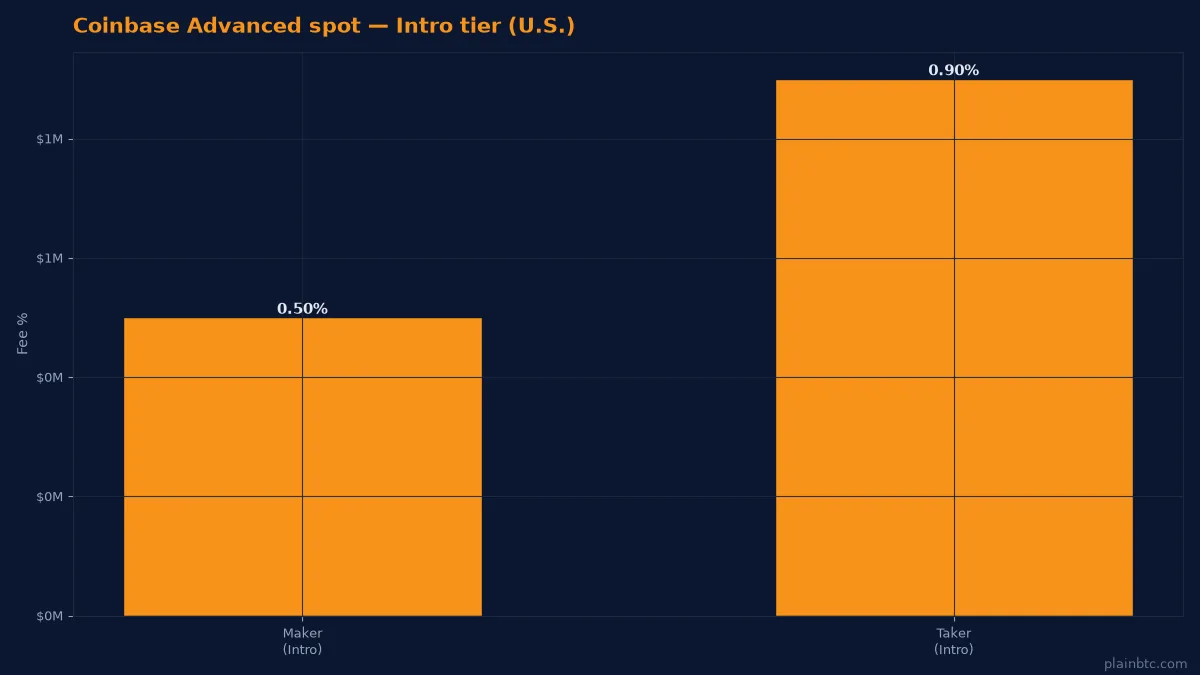
- Coinbase Advanced has no spread. You pay maker or taker fees by volume tier. Coinbase’s public Advanced VIP table lists the Intro tier at 0.50% maker / 0.90% taker for spot.
- Simple limit orders add a separate 1% execution fee, and Coinbase may also charge a payment-method Coinbase fee (its help page cites 1.875% as an example that varies by method).
- Always compare the total on the preview screen before you confirm. Fees change, and Coinbase says it occasionally tests fee and spread changes by region and order type.
The short answer
For most U.S. beginners buying a small amount of bitcoin, the simple Coinbase app is easiest, but it is usually not the cheapest path. The quoted price already embeds a spread, and other fees can stack on top depending on how you pay. If you are comfortable placing a limit order, Coinbase Advanced removes the spread and charges a published maker/taker schedule instead.
None of this is financial advice. Fee schedules change. Trust the numbers Coinbase shows you in the app on the day you trade.
Fee type 1: the simple-app spread
On simple buy, sell, and convert orders, Coinbase includes a spread in the quoted price. The spread is the gap between the market price and the price you are offered. Coinbase says the spread helps it lock in your quoted price while you review the order, that it may keep any excess spread, and that the spread can vary for similar transactions.
You can see the spread before you confirm:
- On buy and sell orders, tap the tooltip next to the asset’s price line.
- On convert orders, tap the tooltip next to the quoted exchange rate.
Because Coinbase does not publish a fixed spread percentage on that help page, third-party “Coinbase fee is X%” tables are often stale. The only number that matters for your order is the one on your preview screen.
Fee type 2: Coinbase fees and simple limit orders
Beyond the spread, Coinbase says trading fees depend on payment method, order size, market conditions, location, asset, and other costs it incurs. Those fees are shown on the trade preview before you submit.
For simple limit orders, Coinbase discloses two extra pieces:
- A separate 1% limit-order execution fee on each limit buy or limit sell.
- A possible additional Coinbase fee that varies by payment method (the help page gives 1.875% as an example).
Both show up in the fee breakdown on the preview screen and in your transaction history. Coinbase One’s zero-trading-fee benefit does not waive that 1% simple limit-order fee.
Fee type 3: Coinbase Advanced maker and taker
Coinbase Advanced trades against the order book, so no spread is added. Instead you pay a maker fee or a taker fee:
- Taker: an order that fills immediately (for example a market order) pays the higher taker rate.
- Maker: a resting limit order that waits on the book pays the lower maker rate when it fills.
- A partially filled order can pay both: taker on the immediate part, maker on the rest.
Your tier is based on recent volume or USDC balance criteria, whichever favors you. Coinbase says to check your live rates inside Advanced. For a public reference point, Coinbase’s Advanced VIP page lists an Intro spot tier of 0.50% maker and 0.90% taker, with lower rates as volume or USDC balance rises, down to 0% maker / 0.02% taker at the top VIP level. Rates are regional; ignore EU or other-market quotes if you trade from the U.S.
Coinbase One, network fees, and cash-out costs
Coinbase One is a paid subscription that can waive trading fees on qualifying simple buys and sells up to a monthly cap. Coinbase still notes that a spread may remain in quoted prices for some trades, and that DEX service fees and the 1% simple limit-order fee are not covered by the zero-fee benefit.
Separate from trading fees:
- Network fees apply when you send crypto off Coinbase. Coinbase charges based on its estimate of prevailing network fees and discloses the amount at send time. Lightning bitcoin sends carry a disclosed 0.2% processing fee.
- Adding cash or cashing out can carry a payment-method fee. Review that line before you confirm. Standard ACH bank transfers are commonly free on Coinbase’s side, while instant cashouts to eligible cards or RTP-enabled banks can cost more for speed.
- Selling crypto into your USD balance is a trade (so spread/fees apply); moving that USD to your bank is a separate cash-out step. See our cash-out guide.
What a $1,000 beginner buy might look like
Imagine you want about $1,000 of bitcoin.
- Simple Buy with a debit card. The preview might show a spread plus a Coinbase fee tied to the card. The bitcoin you receive will be less than $1,000 ÷ spot price because both pieces come out of what you pay. Card buys are convenient and often among the more expensive options.
- Simple Buy funded from your Coinbase USD balance (ACH deposit first). You still pay the simple-trade spread/fee, but you avoid a card fee. ACH deposits usually take a few business days to fully clear.
- Coinbase Advanced limit order as a maker. At the published Intro maker rate of 0.50%, a $1,000 notional order would show about $5 in trading fee if it rests and fills as a maker, with no spread. You must set the limit price yourself and wait for a fill.
These are illustrations, not quotes. Coinbase calculates the live total at order time. Always read the preview.
How to keep fees down without overcomplicating things
- Prefer ACH into your USD balance over a credit or debit card when you can wait.
- Open the fee tooltip on every preview and compare simple vs Advanced for the same size.
- On Advanced, use limit orders you are willing to wait on if you want the maker rate.
- Avoid unnecessary converts (crypto → crypto) when you only need USD or bitcoin; each convert can embed a spread.
- If you trade often, check whether Coinbase One’s monthly fee is lower than the trading fees you actually pay.
- For larger recurring buys, see our notes on dollar-cost averaging so fees do not eat tiny purchases.
Bottom line
Coinbase fees are transparent on the preview screen even when they are not a single published percentage. Beginners usually overpay by buying with a card on the simple screen without checking the tooltip. Advanced Trade is more work, but its published maker/taker schedule and lack of spread make costs easier to compare. Start with an amount you can afford to learn on, read every preview line, and only then scale up.
If you are ready to open an account, you can sign up on Coinbase through our referral link and follow our step-by-step first-bitcoin guide. For safety basics first, read Is Coinbase safe for beginners?.
FAQ
Does Coinbase charge a flat fee to buy bitcoin?
No. Simple buys use a variable spread inside the quoted price plus any Coinbase fee shown on the preview. Advanced Trade uses maker/taker percentages by tier instead of a spread.
What is the Coinbase Advanced fee for beginners?
Coinbase’s public Advanced VIP table lists the Intro spot tier at 0.50% maker and 0.90% taker. Your live tier inside the app is authoritative, and rates fall with higher 30-day volume or qualifying USDC balances.
Is Coinbase One worth it for fees?
It can be if your monthly simple-trade fees would exceed the subscription cost. It does not remove every cost: spreads can still appear, and the 1% simple limit-order fee and DEX service fees are excluded from the zero-fee benefit.
Why is my Coinbase fee different from a friend’s?
Coinbase says fees can vary with payment method, order size, market conditions, location, asset, and tests it runs by region. Two similar orders can show different totals.
Do I pay fees to withdraw USD to my bank?
ACH withdrawals are often free on Coinbase’s side but take several business days. Instant cashouts to eligible cards or RTP banks can carry a fee for speed. Always check the cash-out preview.
Next, learn the exact steps to sell bitcoin and move USD to your bank.
Start on Coinbase with this referral link
Open a new Coinbase account through the link below if you are ready to begin. Eligible new users may receive a bonus after a qualifying trade; terms vary by country and Coinbase’s current terms.
Sign up on Coinbase with this linkNot financial advice. This guide is educational only. It is not investment, trading, legal, or tax advice. Cryptocurrency is volatile and you can lose money. Confirm current steps, fees, and eligibility in Coinbase’s own help center before acting, and consider professional advice for your situation.